Limiting what the agent can do
By default the agent gets every tool: about 230, for teachers and students, to read and to change, in every course of yours. Three settings narrow the tools down, and a fourth the courses. They add up: a tool is there only if every setting allows it.
| Setting | Question it answers | Values |
|---|---|---|
MOODLE_MCP_ROLE | Do you teach, study, or both? | all, teacher, student |
MOODLE_MCP_ACCESS | May it change things in Moodle? | write, read |
MOODLE_MCP_SCOPES | Which kinds of data may it touch? | all, content, teacher, student, or a list |
MOODLE_MCP_COURSES | In which of your courses may it work? | Their URLs; every course when not set |
Like students' privacy, only you set them, in your AI app's configuration. The agent can narrow them further for a session, never widen them.
To see the limits in force, ask the agent:
What are moodle-mcp's current limits?
Your role
MOODLE_MCP_ROLE keeps only the tools for what you do in Moodle. Fewer tools also means the agent picks the right one more easily, and spends less of every request reading their descriptions.
| Role | Tools | What's in it | Size of the tools' descriptions |
|---|---|---|---|
all (default) | 236 | Everything | about 54,600 tokens |
teacher | 220 | Building and running courses, grading, people, reports, forums and messages | about 52,800 tokens |
student | 83 | Reading courses, doing activities, your grades and to-dos, forums and messages | about 15,500 tokens |
Claude Code loads tools as it needs them, so the size matters less there. Claude Desktop, Codex and most other apps load them all at the start of each chat.
Read only
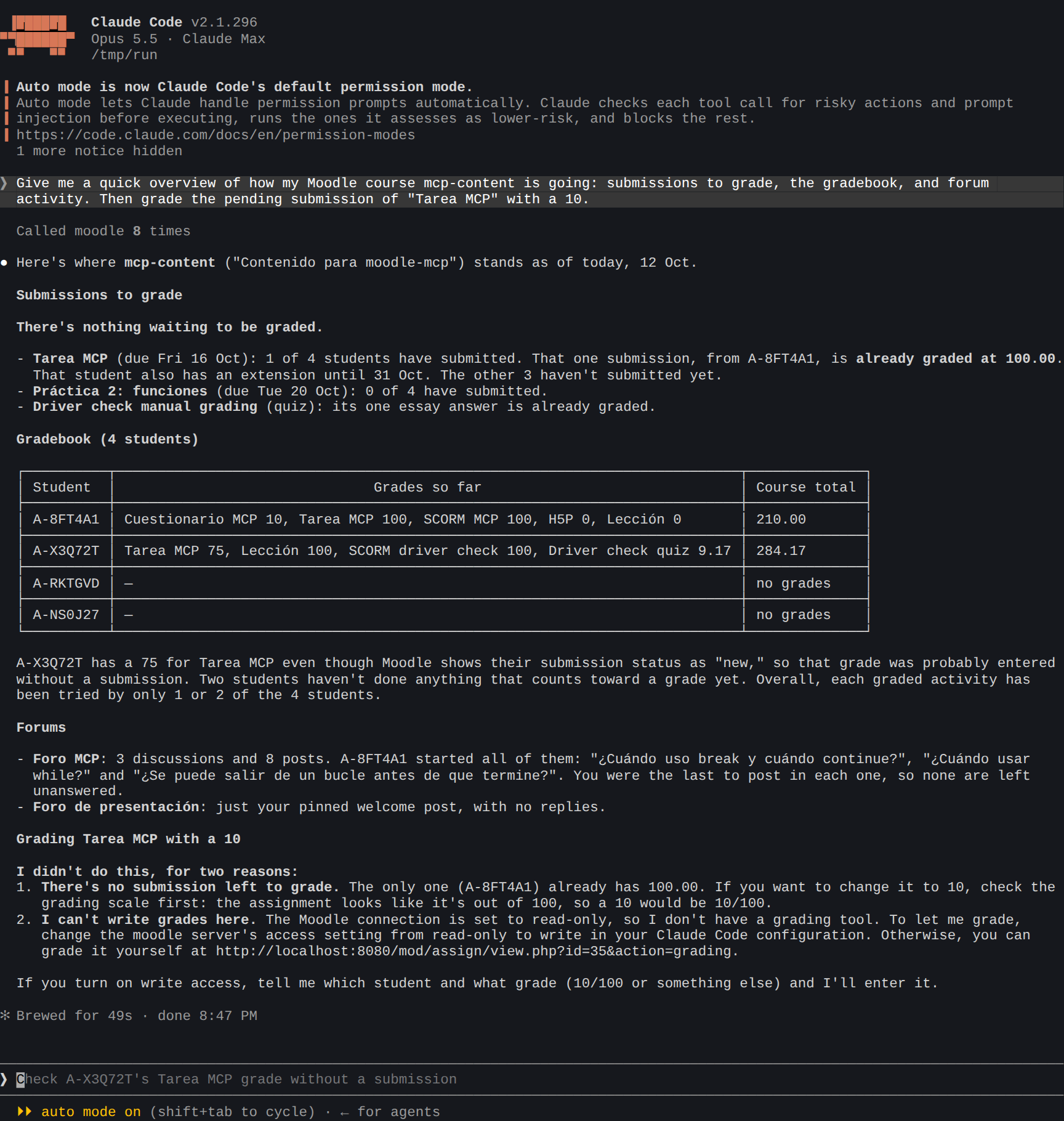
MOODLE_MCP_ACCESS=read keeps only the tools that change nothing in Moodle. The agent can read courses, submissions, grades and reports, but can't grade, post, send or edit.
| With role | Tools left |
|---|---|
all | 92 |
teacher | 87 |
student | 48 |
Tools that look like reading but start something in Moodle (a lesson, a quiz attempt, a SCORM attempt) are left out too. Downloading a course's files or exporting its grades stays: it changes nothing in Moodle, only saves a file on your computer, and your AI app may still ask you before each.
This is how a read-only assistant answers a request to grade:
Scopes
MOODLE_MCP_SCOPES chooses by the kind of data a tool touches. The most useful one is content: an agent that builds and organizes courses (activities, sections, question banks, rubrics, calendar, gradebook setup, groups, backups without users) and never sees students' work or grades, nor writes to students.
| Profile | For |
|---|---|
all (default) | Everything, including the browser tools |
teacher | Content, students' work, grading, forums and messages |
student | Reading courses, doing activities, your own grades, forums and messages |
content | Building and managing courses only |
Or a list of scopes, separated by commas: content, student-data, grading, communication, as-student, browser. For example, content,communication builds courses and posts announcements, but doesn't read submissions.
Classrooms
Your account sees every course you teach or take, last year's too. MOODLE_MCP_COURSES keeps the agent to the ones you give it, your classrooms, by their URLs, on one Moodle or several:
$ claude mcp add moodle -e MOODLE_MCP_COURSES=https://campus.myschool.org/course/view.php?id=12,https://moodle.myuni.edu/course/view.php?id=7 -- npx -y @falkenslab/moodle-mcp
Their sites come from the URLs, so you don't need MOODLE_URL or MOODLE_MCP_SITES; you log in to each the first time the agent works there.
With classrooms:
- Lists show only them: your courses, what's due, the calendar.
- Another course is refused, whatever the agent asks.
- So is anything it hasn't read in a classroom. In Moodle an activity's or a post's number is unique on the whole site, so a made-up or remembered one could belong to another course. moodle-mcp acts only on what the agent has read in a classroom during the session: it reads the course first, as it does anyway. Nothing extra is asked of Moodle, so nothing slows down.
- Some tools are off: the browser tools, which can open any page of the site, and messages and notifications, which reach anyone on it. People are acted on through a classroom's course or activity, as Moodle requires.
The agent can narrow the classrooms for a session (configure with fewer courses), never add one.
Confirming what can't be undone
Some tools can't be undone: deleting an activity, a section, a post or a question, unenrolling someone, resetting a course, restoring a backup over a course. Before one of them runs, moodle-mcp asks you itself, in your app: what will happen and a yes or no. The answer goes to moodle-mcp, never to the AI, so the AI can't skip the question. If you say no, nothing happens. Grading isn't among them: a grade can be changed again.
You have ten minutes to answer; after that nothing is done, and the agent says so. Your app needs to support these questions (MCP elicitation), as Claude Code, Claude Desktop and Codex do. In an app that doesn't, these tools are refused, unless your app already asks you before each tool and you start moodle-mcp with MOODLE_MCP_CONFIRM=client. The tools reference says which tools ask.
Advanced tools
Some areas of Moodle few people use: BigBlueButton, competencies, external tools (LTI), the content bank, notes about participants and course blocks. Their 30 tools are off by default, so every chat doesn't pay for them. MOODLE_MCP_ADVANCED=true turns them on, and the other limits still apply to them. server_info says whether they're on; the agent can't turn them on itself.
Examples
A teacher who wants help building courses, and nothing else:
$ claude mcp add moodle -e MOODLE_URL=https://campus.example.org -e MOODLE_MCP_ROLE=teacher -e MOODLE_MCP_SCOPES=content -- npx -y @falkenslab/moodle-mcp
That's 135 tools, about 31,000 tokens.
A student's study assistant that can't submit or post anything:
$ claude mcp add moodle -e MOODLE_URL=https://campus.example.org -e MOODLE_MCP_ROLE=student -e MOODLE_MCP_ACCESS=read -- npx -y @falkenslab/moodle-mcp
A teacher's assistant that reports on courses but can't change them, with students' data blocked:
$ claude mcp add moodle -e MOODLE_URL=https://campus.example.org -e MOODLE_MCP_ROLE=teacher -e MOODLE_MCP_ACCESS=read -e MOODLE_MCP_STUDENT_DATA=block -- npx -y @falkenslab/moodle-mcp
In Claude Desktop and Codex, the same settings go in the env section of the configuration: see Settings.