The course's memory
Each new conversation starts from scratch, but not in what it knows about the course: the assistant takes notes in the course's knowledge folder, reads them when it starts and keeps adding to them while it works. That's why the more you use it, the better it knows your course.
In the desktop app and in the web version you have them in the Memory view, with its Knowledge base (its notes) and Sources (your documents) tabs.
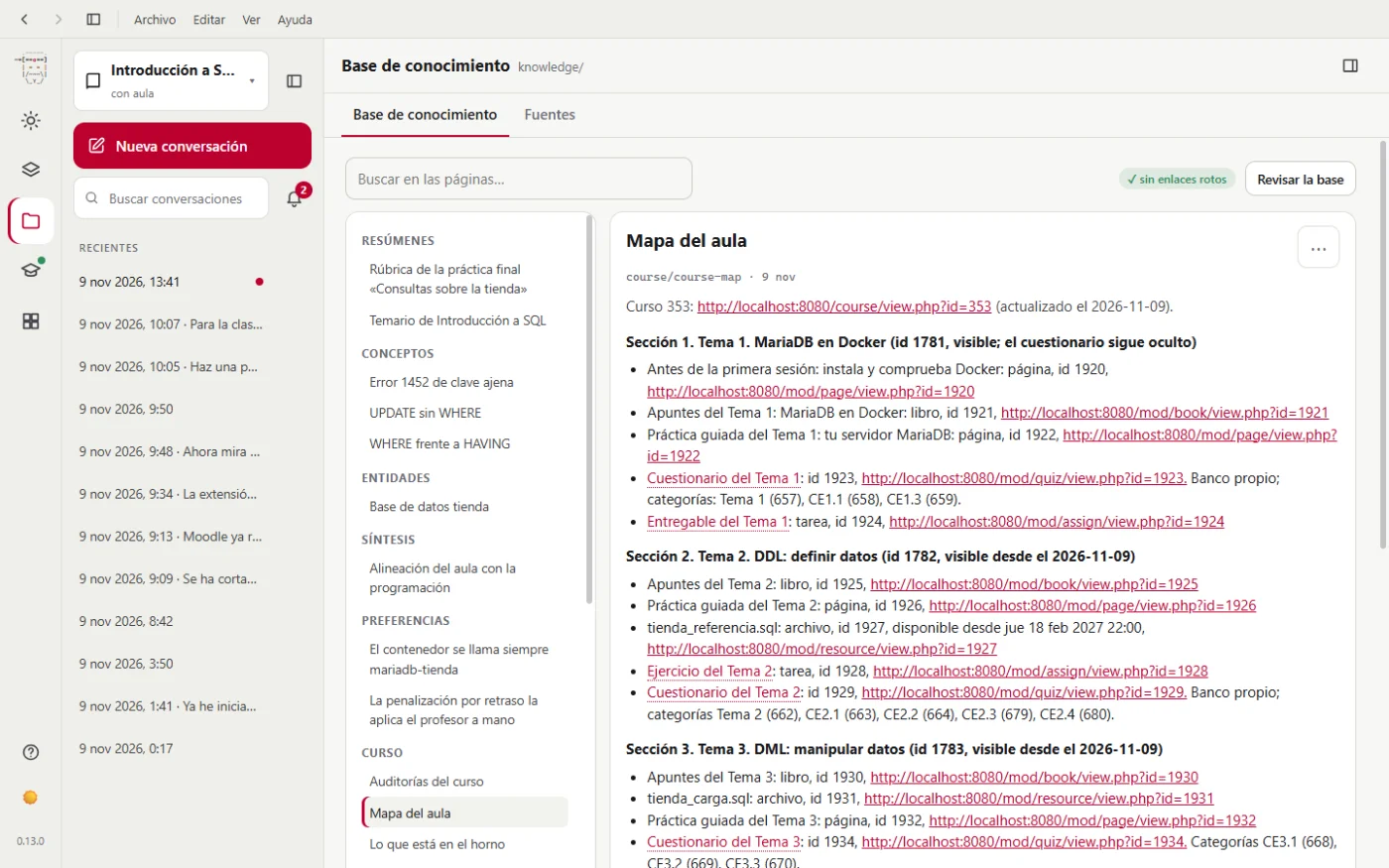
What it remembers
| It remembers | Where |
|---|---|
| How the course is assessed, its deadlines and its channels | orientation.md |
| Where each section and activity of the course is: its number and its link | course-map.md |
| Which activity and question types it has seen in your course, and how grades are calculated | moodle-capabilities.md |
| Your teaching plan | teaching-plan.md |
| Each unit: objectives, what it created, the questions that keep coming up in the forum | topics/ (one page per unit) |
| Each graded activity: criteria it applied, rubric, imported questions | activities/ (one page per activity) |
| How the class is evolving, review after review | progress.md |
| The course audits, with their date | course-audit.md |
| The activities in progress: planned, being built, hidden to test them or just delivered | drafts.md |
| A summary of each document you gave it | summaries/ |
| An overview of the course | overview.md |
| Everything linked, with an index and a change log | index.md and log.md |
How you notice it in practice
An example. One Monday you tell it:
Grade Assignment 2. Late submissions, 20% off, and give a lot of weight to commenting the code.
It grades and writes down, on that assignment's page, the criteria it applied. Days later, in another conversation, late submissions come in:
Grade the new submissions for Assignment 2.
Before starting, it reads in its notes which criteria it applied the first time, so it isn't harsher or softer with some students than with others.
The same with the class: since it keeps each progress review with its date, when you ask it “how is the class doing compared with last time?” it can tell you what has improved and what hasn't.
The three folders
sources: your documents. The teaching plan, the rubrics, the solutions, your notes. It only reads them; it never changes them.knowledge: its notes. What it has learned about the course and from your documents.drafts: what it prepares for Moodle. The text of a page, a quiz, a web activity, before uploading them.
You can read and correct them
In the app and on the web you can read them in Knowledge base, with its search and the links between them. They're ordinary text files, in Markdown format: you can also open them with any editor, or with Obsidian to see how they link to each other.
If it remembers something wrong, you have two options:
- Tell it in the conversation: “The late submission criterion has changed: it's now 10% off.” It updates the page.
- Or edit the page in
knowledgeyourself and save it.
To look them up without opening Moodle, use /knowledge:query with your question. To have it check that they're complete and properly linked, /knowledge:lint.
What it doesn't keep
- It doesn't keep records of individual students. Its notes on progress and the forum only hold trends for the class (how many are falling behind and why), never a record with names. Besides, your students reach it under an alias (“A-7KQ2XM”), not by their name.
- It doesn't keep your password. It doesn't even know it: you log in yourself in the window the moodle-teacher extension opens, and it's the extension that keeps the session.
Each course, its own memory
Each course has its own notes, in its folder. What it learns from one course doesn't carry over to another.
What it remembers about you, in all your courses
Besides each course's notes, miyagi remembers how you like to work, in all your subjects: what to call you, your tone, how to write feedback for students, your formats and your tools. Tell it once ("call me Paco", "feedback short, starting with what's right") and in another subject it follows it from the first message.
- It only keeps what you write to it, in your words; never what comes from a document or a page.
- What belongs to one course (its teaching plan, a grading criterion, what an exam accepts) goes to that course's notes, not here.
- It never keeps a student, even if you tell it about one: not their name, their needs or their grades.
- Type
/memory:listin the chat to see what it remembers and/memory:forgetwith an entry's name to make it forget it. It's on your computer, in~/.miyagi/memory/, one file per entry.
Want to know how it's built inside, what ingesting (miyagi ingest in the terminal) does step by step or which formats it accepts? It's in The knowledge base.